Bulk Actions - Deleting Contacts
Using the Bulk Actions features in your Contacts/Smart Lists section, you can perform multiple one-off actions to selected or all contacts. Here’s how to delete contacts using the bulk action feature:
Step 1: Choose Your Contacts
- Navigate to your contacts.
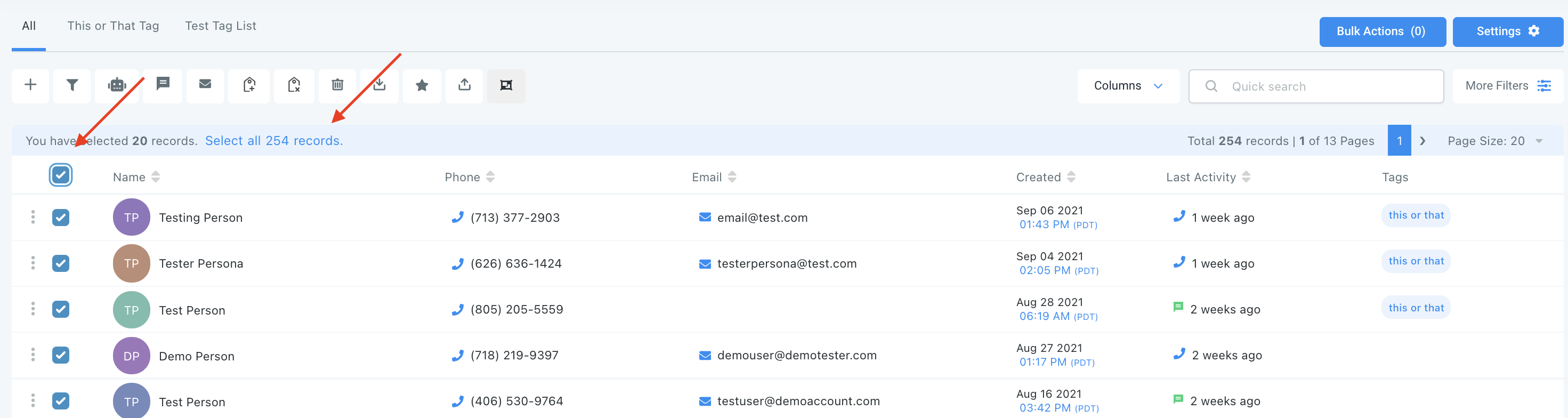
- Check the box to select contact records.
- You can also check the box at the top to select all on that page, and you can click the hyperlink to select all contacts in LANA.
Step 2: Choose Your Action
- Choose the trashcan icon for “Delete Contacts”.
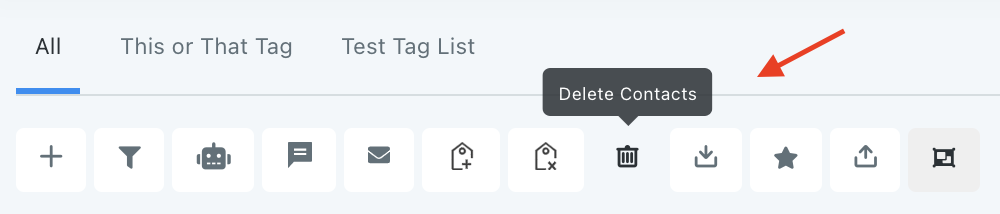
- This will remove the selected contacts from LANA entirely.
NOTE: Deleting any contact will also remove them from Conversation, Notes, Opportunities, Tasks, Appointments, Manual Actions and Campaigns.
NOTE: If you cannot see the delete option, please contact your LANA admin regarding your permissions
Related Articles
Using the Bulk Action Features
Using the Bulk Actions features in your Contacts/Smart Lists section, you can perform multiple one-off actions to selected or all contacts. From sending an email or SMS to updating the pipeline stage and more, follow the steps below to learn how to ...Using the Bulk Action Features
Using the Bulk Actions features in your Contacts/Smart Lists section, you can perform multiple one-off actions to selected or all contacts. From sending an email or SMS to updating the pipeline stage and more, follow the steps below to learn how to ...Bulk Actions - Merge Duplicate Contacts
Using the Bulk Actions features in your Contacts/Smart Lists section, you can perform multiple one-off actions to selected or all contacts. Here’s how to merge duplicate contacts using the bulk action feature: Step 1: Choose Your Contacts Navigate to ...Bulk Actions
This video discusses the bulk actions menu in the contacts area.Bulk Actions - Import and Export Contacts
Using the Bulk Actions features in your Contacts/Smart Lists section, you can perform multiple one-off actions to selected or all contacts. Here’s how to export contacts using the bulk action feature: Step 1: Choose Your Contacts Navigate to your ...