How to End an Opportunity
Depending on the situation, if an Opportunity isn't going to work out or close, you may want to delete or archive the Opportunity. There are multiple ways to do this.
Part 1: Update Opportunity Status. You can update the Opportunity status if it isn't going to work out, to either "lost" or "abandoned".
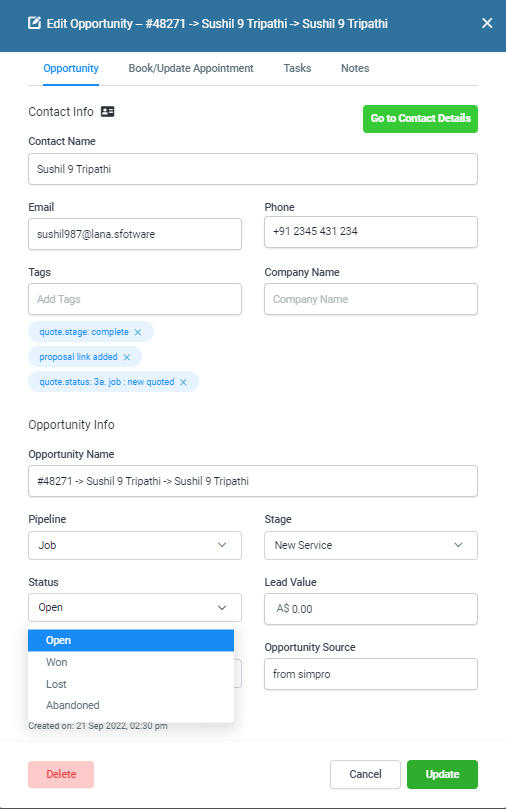
Step 1: Click into the Opportunity and scroll to the bottom.
Step 2: Under the "Status" dropdown, change the status appropriately.
Step 3: Hit Save to update your changes.
Part 2: Delete an Opportunity. You can do this to remove it from the list entirely.

Step 1: Click into the Opportunity and scroll to the bottom.
Step 2: Scroll to the bottom and click the red "Delete" button. This will completely delete the Opportunity.
Related Articles
Updating an Opportunity
In this video discusses how to update opportunity information including accessing the opportunity card, adding and removing tags, editing the opportunity name, change opportunity pipeline, adding and updating appointments, adding tasks and notes and ...Opportunity Card View - UPDATE
A new unlabeled card layout for opportunity pipelines enhances data density and customization options. This compact design allows users to manage large pipelines more efficiently by displaying essential information in a streamlined format. Users can ...How to customise your opportunity card view.
Opportunity Card Customization: Personalize Your Pipeline View We’re thrilled to announce the new Opportunity Card Customization feature! With this update, you can personalize the fields displayed on opportunity cards in the pipeline view. Customize ...Lead Duplicate Contact Feature
Client who have Jobs Management Software usually encounters an issue with a duplicate contact. However, allowing duplicate contact on LANA is a must because most of the time they will create multiple quotes or job for an existing contact. LANA will ...How To Add A Contact To Multiple Opportunities
You may want to add a contact to multiple opportunities. Follow these steps to learn how to allow duplicate opportunities. After that is done, there are two ways to add them: you can add an opportunity in the individual contact's profile, or use the ...