How to connect Multiple Facebook Page
Connecting Multiple Facebook Pages to Your LANA Subaccount
With LANA Software’s latest integration, you can now connect multiple Facebook pages to your subaccount for seamless management across all your business profiles. This feature allows you to track leads, streamline conversations, and manage engagement across multiple Facebook pages—all from within LANA.
What Can I Achieve with This Feature?
Leads Sync
Automatically sync leads from Facebook Lead Ads across multiple pages, with clear attribution to help you track each lead’s source.Unified Conversations
Chat with customers from all your Facebook pages through integrated Facebook and Instagram chat features.Automation
Set up customized workflows that automate customer engagement across multiple Facebook pages, freeing up time for you and your team.Reputation Management
Oversee reviews and manage responses across each Facebook page to maintain a consistent brand presence and engage with customer feedback effectively.
How to Connect Multiple Pages
Follow these steps to connect multiple Facebook pages to your LANA account:
Step 1: Navigate to Settings > Integrations
Go to the Integrations section under Settings to begin the connection process.
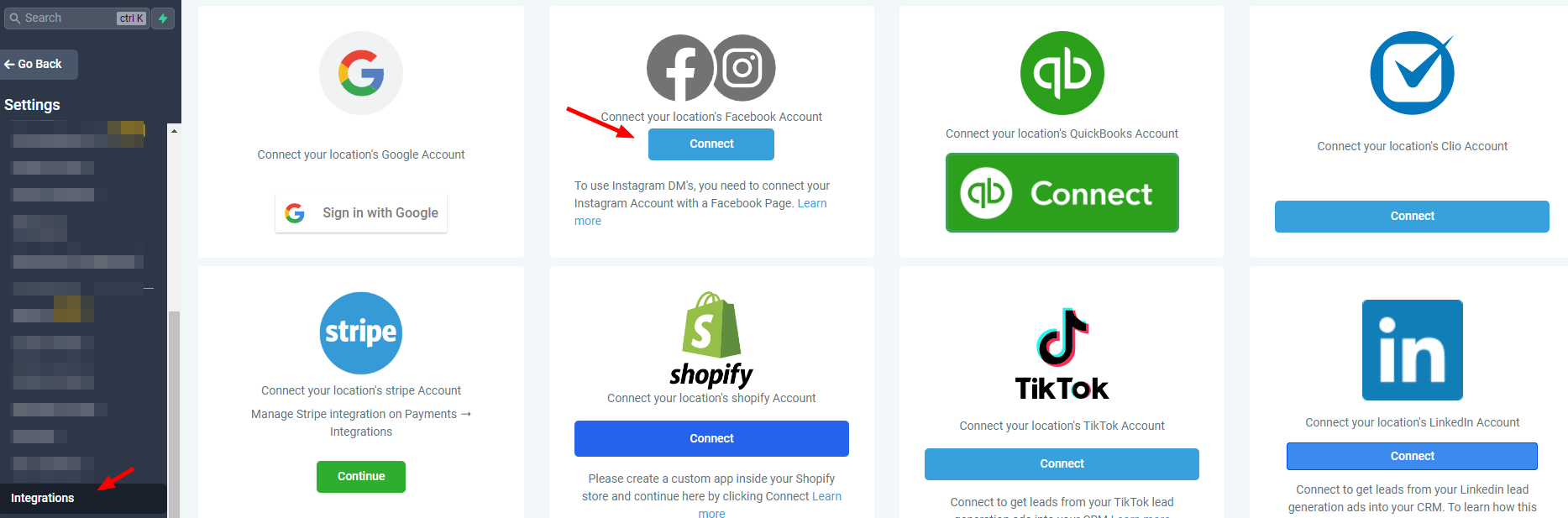
Step 2: Connect Your Facebook Account
Click on “Connect,” then log in to your Facebook account. Approve all necessary permissions for LeadConnector to integrate with your account and access page data.

Step 3: Select Pages to Integrate
Choose the pages you want to connect to LANA. You can either sync only new leads or also sync leads from the previous 90 days.

Step 4: Map Lead Form Fields
Map fields from your Facebook Lead Ad forms to the corresponding custom fields in your LANA Contacts, ensuring accurate data capture.


You can check out this article for further details on how you can map out Facebook Form.
Managing Your Facebook Page Integrations
Managing Pages
To modify which pages are integrated, go to Manage Pages within the Facebook Integrations menu. Here, you can select or unselect pages based on your current preferences. For instance, if you no longer wish to integrate a specific page, simply unselect it in the Manage Pages menu.

Adjusting Messaging Settings
Use the Settings button to manage messaging capabilities for each integrated page. For example, if you want to disable chat features on one of your pages, you can turn off the messaging option specifically for that page.

With these tools, LANA Software lets you centralize your multi-page Facebook management, streamline customer interactions, and keep your social engagement consistent across platforms.
Related Articles
How to Connect to Your Facebook Page for Use in the Social Planner
The Social Planner tool allows you to connect multiple social media accounts and manage them in one area. By connecting Facebook pages, you can use the Social Planner to schedule, create, and push out posts to your Facebook pages, along with Facebook ...Manage Multiple Facebook Pages with LANA Software's New Integration Feature
Connect Multiple Facebook Pages to Your LANA Software Account We’re excited to announce one of our most highly anticipated integration features: connecting multiple Facebook pages within your LANA Software account! This powerful update lets you ...How to Connect to Your Google My Business Page for Use in the Social Planner
The Social Planner tool allows you to connect multiple social media accounts and manage them in one area. By connecting your Google My Business (GMB), you can use the Social Planner to schedule, create, and push out posts to your Google My Business ...How to Connect to Your Facebook Group for Use in the Social Planner
The Social Planner tool allows you to connect multiple social media accounts and manage them in one area. By connecting Facebook Groups, you can use the Social Planner to schedule, create, and push out posts to your Facebook Groups, along with ...Multiple Facebook Page Integration for Reviews
Review Management: Multiple Facebook Page Integration for Reviews! Managing your social media reviews is now simpler than ever! Our latest update allows you to integrate multiple Facebook pages into one platform, streamlining your review management ...