How To Move Actions in the Workflow Builder
Within a Workflow, you may want to make changes and reorder one or multiple actions. Rather than deleting and recreating the action(s) you can move one or multiple actions to another portion of your Workflow. This can save you time if you want to just reorder one or multiple actions, vs. redoing an entire Workflow as you make adjustments.
Follow these simple steps to learn how to move one or multiple Workflow actions in the builder:
- Hover over a Workflow action to display the three-dot menu icon.
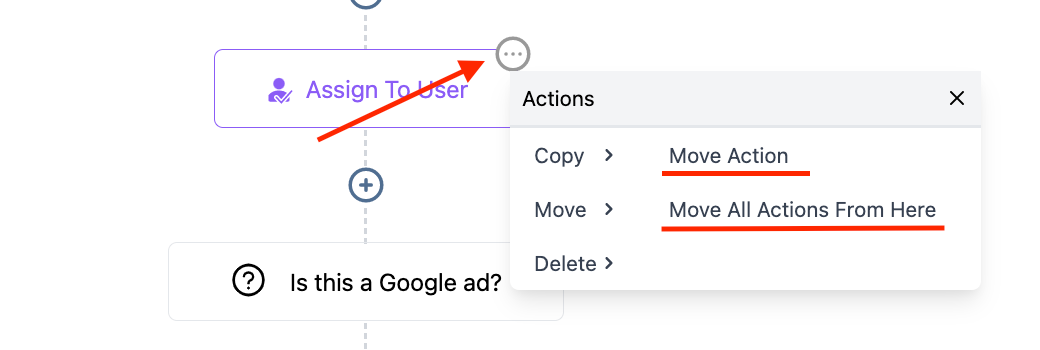
- Click this to open the “Actions” menu.
- From the menu, choose “Move”.
- Select “Move Action” to move one individual Workflow action.
- Select “Move All Actions From Here” to move that particular action and all following actions.
- The Workflow will now display “Move Here” icons. Click any of them to move the Workflow action(s) to that spot.
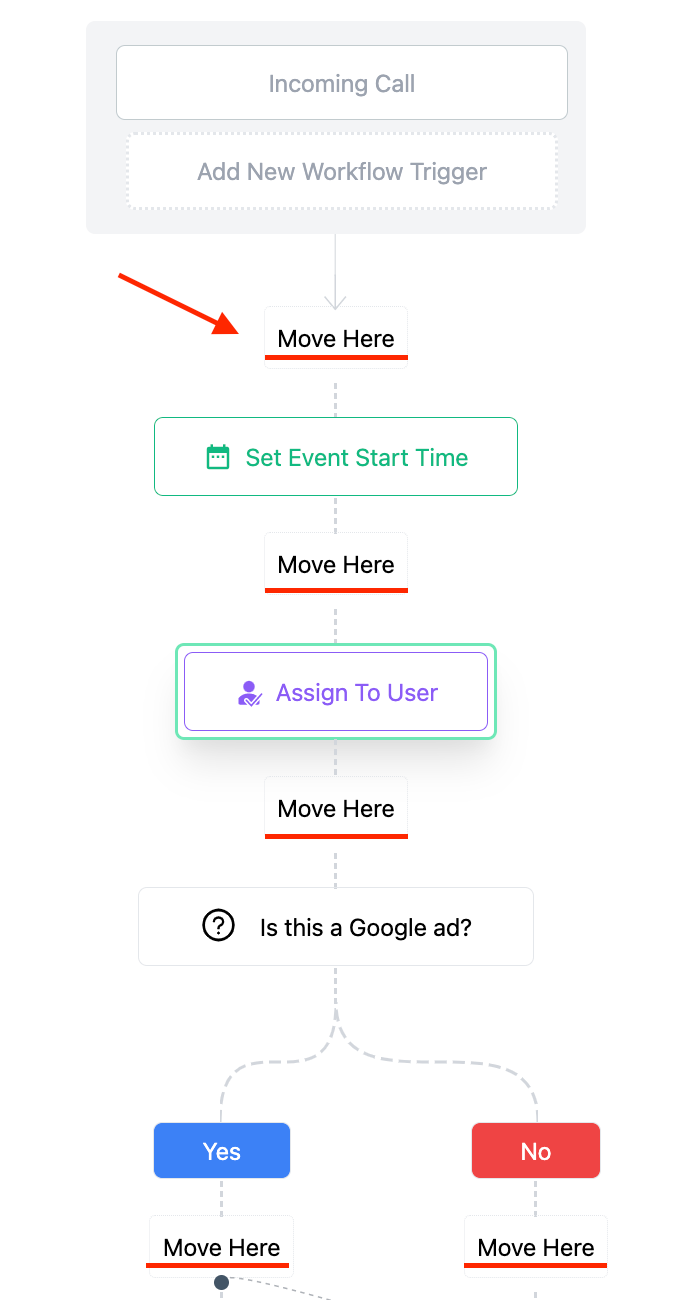
NOTE: If you change your mind and want to cancel the moving of action(s), just click into the white/blank space on the side of your Workflow and it will reset/cancel the process.
Related Articles
List of Workflow Actions
Within the Workflow Builder, you can add multiple actions to fire off in a series based on one or more triggers. Click the + icon anywhere in the Workflow to add an action. Below is a complete list of available actions: External Communications Send ...Using the Wait Action in the Workflow Builder
Using the Wait action in the Workflow Builder allows you to hold Contacts before advancing to the next step of a Workflow. This can be useful for many reasons, from appointment bookings/reminders, to follow ups, and more. Now, let’s take a look at ...List of Workflow Triggers
Within the Workflow Builder you can have one or multiple triggers to fire off the workflow’s series of actions. Below is a complete list of workflow trigger options: Appointments Appointment Status: runs on all appointment status updates Customer ...Using the Contact Changed Workflow Trigger
Within the Workflow builder, the “Contact Changed” workflow trigger allows you to automate actions when a contact record is modified. You can trigger events in a Workflow when a contact record is changed based on the following items: Tags being added ...Customizing LANA Workflow Document - simPRO 2.0 Update
LANA x simPRO 2.0 Integration Workflow Document We’re thrilled to introduce the latest update to the simPRO 2.0 Workflow document! This update includes recent changes, and we’re here to guide you through maximizing the customization of your ...